
A worker reaches into a maintenance panel without verifying isolation. Seconds later, machinery activates unexpectedly. The result: severe injury. This scenario isn’t rare. It’s preventable—through proper lockout tagout (LOTO) procedures, reinforced by clear visual cues.
When people search for a picture of lockout tagout on equipment, they’re not just looking for an image. They want to understand how LOTO is correctly applied—visually. They’re seeking confirmation that what they’re seeing (or planning to implement) meets safety standards. This article breaks down the real-world application of LOTO visuals, what to look for in effective examples, and how to avoid common missteps.
Why Visuals Matter in Lockout Tagout Compliance
A picture of lockout tagout on equipment does more than illustrate a procedure—it communicates compliance, clarity, and culture.
OSHA’s standard 29 CFR 1910.147 requires that energy sources be isolated during maintenance using lockout devices and tags. But compliance isn’t just about having locks; it’s about ensuring every team member can instantly recognize and verify the lockout status.
Visual verification reduces human error. In high-noise, high-traffic industrial environments, written procedures may be overlooked. A well-placed lock and tag, clearly visible on equipment, signals "Do Not Operate" at a glance.
Consider a conveyor system in a packaging plant. A maintenance technician applies a padlock and tag to the motor disconnect. A supervisor walks by and sees the lock—no need to consult paperwork. The visual cue confirms the equipment is isolated.
Common mistakes in LOTO visuals: - Tags placed out of sight (e.g., behind panels) - Faded, handwritten, or incomplete tags - Multiple locks without identification of individual owners - Missing energy source identification on tags
A strong visual LOTO setup includes: - A durable lock securing the energy-isolating device - A standardized tag with clear warnings, worker name, date, and reason - Visibility from multiple angles - Use of color-coding (e.g., red for lockout, yellow for caution)
What to Look for in a Realistic LOTO Picture
When evaluating a picture of lockout tagout on equipment, assess authenticity and compliance cues.
A realistic image shows:
- Proper Device Application
- The lock must be physically securing a disconnect switch, valve, or circuit breaker—not just dangling nearby.
- Tag Content Completeness
- The tag should include:
- - Employee name
- - Date and time of lockout
- - Department or work group
- - Reason for lockout
- - Contact information
- Equipment Context
- The machinery should be identifiable—e.g., a hydraulic press, pump, or electrical panel. Generic or staged photos lack instructional value.
- Environmental Clarity
- The setting should reflect real working conditions: lighting, space constraints, PPE usage.
- Multiple Lock Scenarios
- Group lockout situations (e.g., maintenance involving several workers) should show a hasp with multiple locks, each owned by a technician.
A poor-quality LOTO image might show a lock on a handrail or a tag taped to a wall. These fail to demonstrate correct application and can mislead training efforts.
Real-World Examples of LOTO in Action
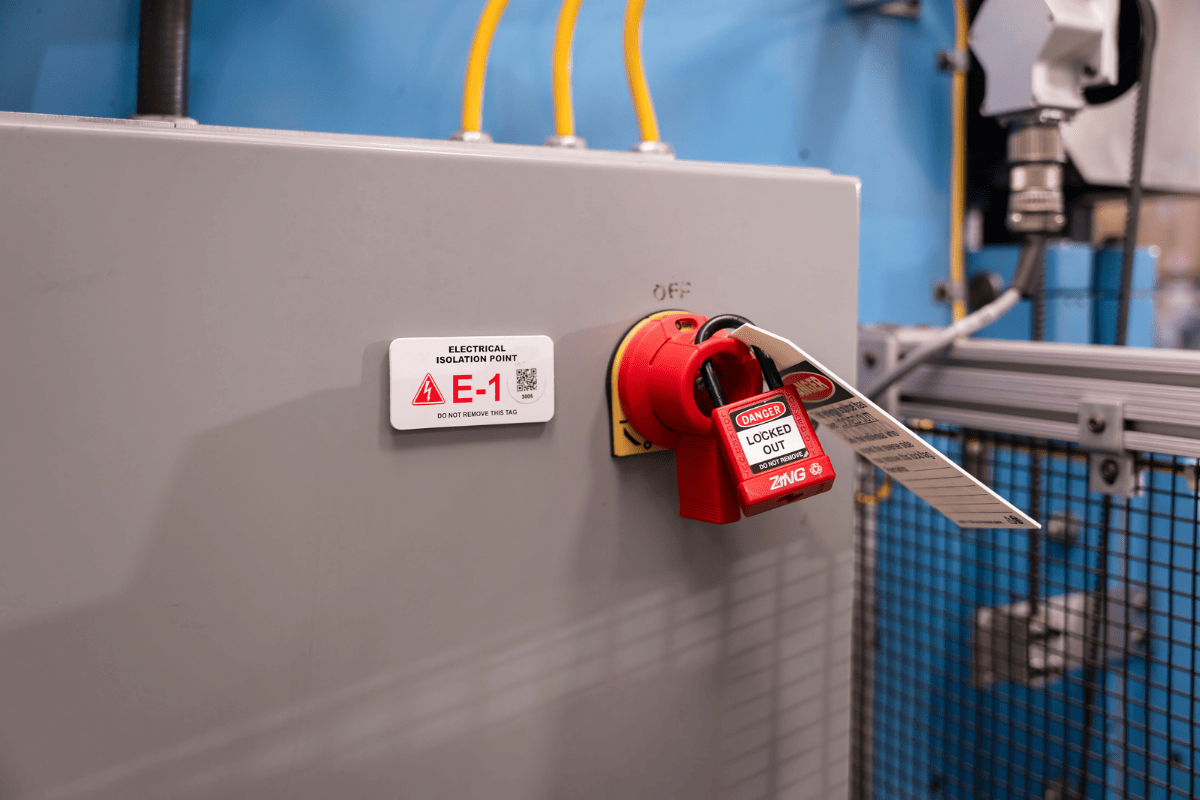
#### 1. Manufacturing Floor – CNC Machine Maintenance A technician services a CNC lathe. Before opening the access panel, they shut off the main power switch, apply a personal lock, and tag it. The tag reads: > “DO NOT OPERATE – Maintenance in Progress > Name: J. Rivera > Dept: Maintenance > Date: 04/05 > Reason: Bearing Replacement”
A photo of this setup shows the lock securing the circuit breaker box, with the tag hanging prominently. Nearby, a second worker applies their own lock for a hydraulic line inspection. Two locks on a group lockout hasp confirm both must clear before restart.
#### 2. HVAC System – Boiler Shutdown A facility manager locks out a boiler during annual inspection. The lock secures the fuel gas valve, and the tag includes a QR code linking to the LOTO procedure. A photo highlights the lock position, tag details, and isolation of both fuel and electrical sources.
#### 3. Warehouse – Conveyor Line Repair Three technicians repair a jammed conveyor. They use a group lockout box. Each applies a personal lock to the main disconnect. A photo shows the hasp, multiple locks, and a tag listing all names. The image also captures the red “Danger – Equipment Locked Out” barrier tape across the walkway, reinforcing the visual signal.
Common LOTO Visual Failures and How to Avoid Them
Even experienced teams make visual mistakes that undermine safety.
| Failure | Risk | Solution |
|---|---|---|
| Lock placed on non-isolating device | False sense of security | Train on correct energy isolation points |
| Tag lacks name or date | Accountability lost | Enforce standardized tag use |
| Locks removed without verification | Premature restart | Require sign-off and group verification |
| Poor lighting or angle | Missed lockout status | Use reflective tags, place locks visibly |
One plant reported a near-miss when a temporary worker restarted a mixer because the lock was hidden behind a pipe. The fix? Redesigned isolation points with clear access and mandatory photo documentation during training.
Workflow tip: Conduct monthly LOTO visual audits. Use photos to compare actual setups against procedure. Share examples in safety meetings—both correct and incorrect—to build recognition.
How to Source or Create Effective LOTO Images
If you’re building training materials or compliance documentation, sourcing or creating accurate LOTO visuals is critical.
Best sources for real LOTO pictures: - Internal photo documentation during audits - OSHA-compliant training libraries (e.g., J. J. Keller, Vivid Learning) - Equipment manufacturers’ safety guides - Industry-specific safety associations (e.g., NFPA, ANSI)
- Creating your own LOTO images:
- Stage realistic scenarios using actual equipment.
- Use standard locks, tags, and PPE.
- Capture multiple angles—front, side, close-up of tag.
- Include context: worker in frame, environment visible.
- Annotate images for training (e.g., arrows pointing to lock location).
Avoid stock photos with staged or incorrect setups. A 2021 NIOSH review found 40% of freely available LOTO images online showed procedural errors—like locks on non-isolating parts.
The visual components of LOTO are standardized for a reason. When you see a picture of lockout tagout on equipment, these elements should stand out:
#### 1. Locks - Must be durable, keyed alike or personal (one key per worker) - Color-coded (typically red) - Non-releasable under tension
#### 2. Tags - Tear-resistant, weatherproof material - Standardized text: “DO NOT OPERATE” - Space for handwritten details - Pre-printed with company name and safety warnings
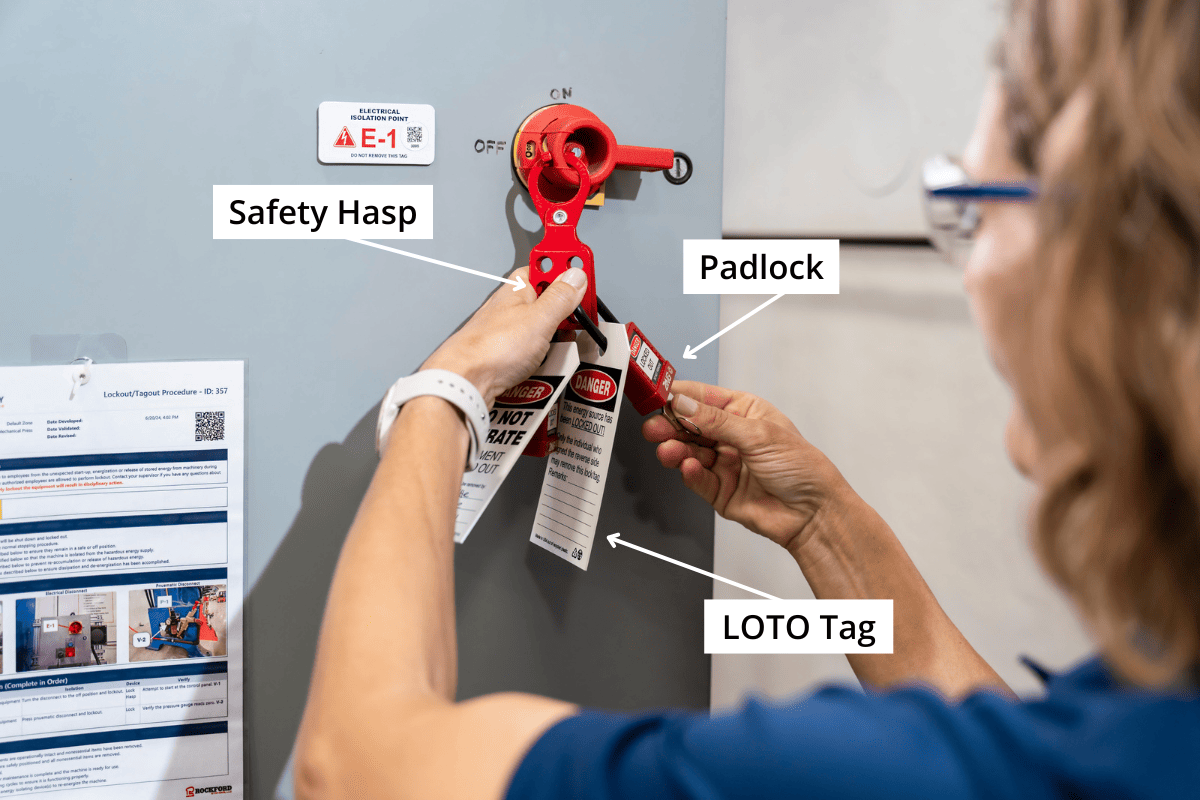
#### 3. Hasps and Lockout Stations - Used for group lockout - Allow multiple locks on a single isolating device - Often mounted near equipment
#### 4. Valve Lockouts - Designed for gate, ball, or needle valves - Prevent handle movement - Visible when applied
#### 5. Electrical Lockout Devices - Circuit breaker lockouts - Plug covers - Fuse removal indicators
A quality LOTO image captures these components in context—not isolated on a table, but applied correctly on live equipment.
Training and Compliance: Using LOTO Pictures Effectively
Pictures aren’t just illustrations—they’re tools for behavioral change.
Use LOTO images in: - New hire orientation - Refresher training every 12 months - Safety briefings before high-risk tasks - Posted signage near critical equipment
One auto parts plant reduced LOTO violations by 68% after introducing a photo-based checklist. Technicians compare their setup to posted images before starting work.
Pro tip: Create a “LOTO Gallery” in your safety office—displaying both correct and incorrect setups. Label the mistakes. Workers remember visuals longer than text.
Final Checklist: Is Your LOTO Visual Ready?
Before using or relying on a picture of lockout tagout on equipment, verify:
✅ Lock is securing the actual energy-isolating device ✅ Tag is filled out completely and legibly ✅ Worker’s name and department are visible ✅ Equipment type and isolation point are clear ✅ No tools or body parts are inside the machine ✅ Multiple workers = multiple locks or group hasp ✅ Environment shows real working conditions
If the image passes this checklist, it’s suitable for training or compliance reference.
Clear visuals save lives. A picture of lockout tagout on equipment isn’t just a snapshot—it’s proof of safety in action. Use real, accurate images to train, audit, and reinforce a culture where every worker knows: if it’s locked out, it stays off.
Review your current LOTO visuals. Replace vague or incorrect ones with photos that reflect true compliance. Train with them. Post them. Make them part of your safety DNA.
FAQ
What should a proper lockout tagout picture show? It should show a lock securing an energy-isolating device (like a breaker or valve), a filled-out tag with worker details, and clear context of the equipment being serviced.
Can I use a stock photo for LOTO training? Only if it accurately reflects your equipment and procedures. Many stock images contain errors—verify lock placement, tag content, and isolation points.
Why is the tag as important as the lock? The tag communicates why the equipment is locked, who is responsible, and when it started. Without it, someone may assume the lock is abandoned.
What’s wrong with a picture showing only the tag? A tag alone isn’t enforceable. The lock is the physical barrier. A photo must show both to demonstrate full compliance.
How do I create a good LOTO training image? Stage a real maintenance scenario, use standard locks and tags, fill out all details, and photograph from multiple angles with good lighting.
Should LOTO pictures include people? Yes—especially in training. Showing a worker applying the lock reinforces procedure and accountability.
Are digital LOTO images acceptable for compliance? Yes, if they’re accurate and used in documented training. However, physical locks and tags are still required in the field.
FAQ
What should you look for in Understanding Lockout Tagout Equipment Visuals? Focus on relevance, practical value, and how well the solution matches real user intent.
Is Understanding Lockout Tagout Equipment Visuals suitable for beginners? That depends on the workflow, but a clear step-by-step approach usually makes it easier to start.
How do you compare options around Understanding Lockout Tagout Equipment Visuals? Compare features, trust signals, limitations, pricing, and ease of implementation.
What mistakes should you avoid? Avoid generic choices, weak validation, and decisions based only on marketing claims.
What is the next best step? Shortlist the most relevant options, validate them quickly, and refine from real-world results.


